Fenix SW05R – 150 Lumens / RED Rechargeable Clip Light.
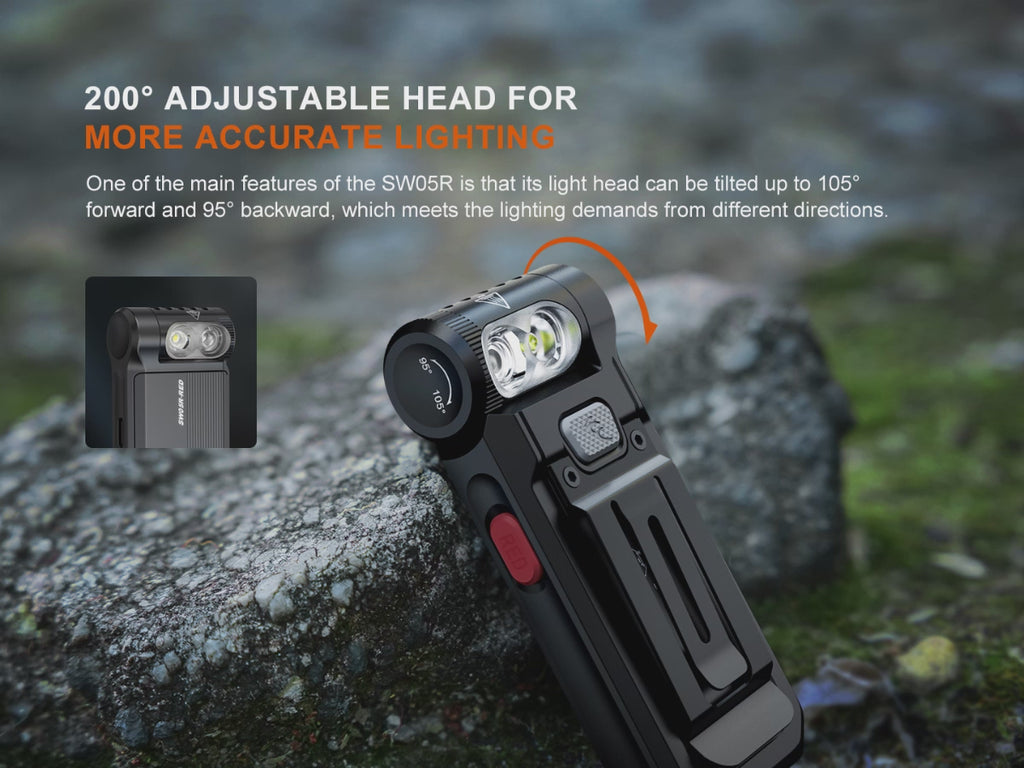
Fenix SW05R-RED is your new go-to clip on flashlight. With up to 150 lumens of brightness and a beam that can reach 128 feet (39 meters), it’s perfect for anything from outdoor adventures to daily use. This clip on flashlight’s 200° adjustable head means you can angle it to shine wherever you need and you also have the choice of 5 different lighting modes: low, medium, or high white light, red light, or red flash. This flashlight is extremely small with a large clip that lets you attach it to your hat or shirt pocket. Go hands-free with the magnetic tail mounted securely to most metal surfaces. Rechargeable via USB-C, this clip on flashlight is perfect for camping, outdoor adventures, or everyday tasks. Compact and ready for action, the SW05R-RED is the ultimate sidekick!
Specifications
Max Lumens:150
Max Beam Distance:128 feet (39 meters)
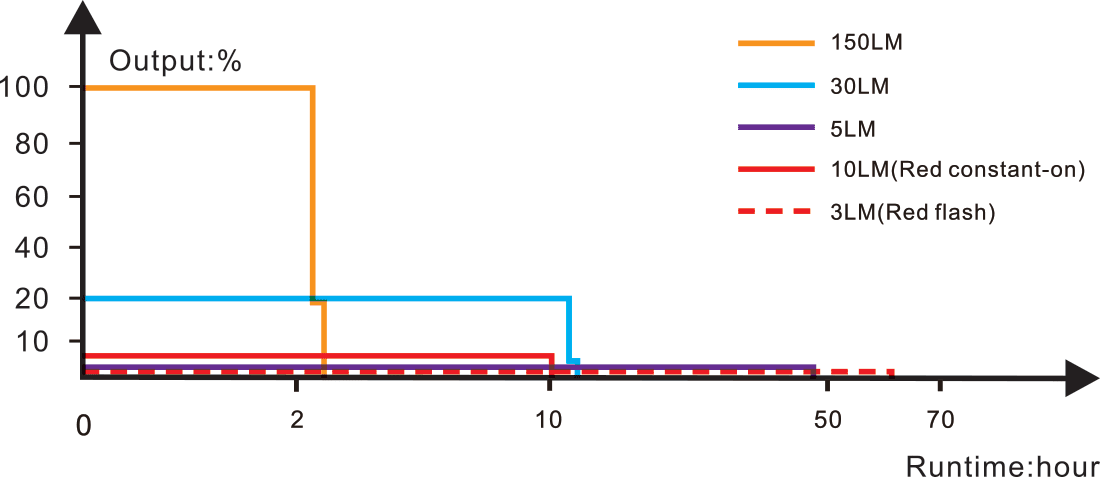
Max Runtime:49 hours
Lighting Modes:Three brightness levels, red light, and red flash
Bulb Type:One high-performance white light LED and one high-performance red light LED
White and red light sources for various lighting demands.
Powered by a built-in 700mAh battery.
Inner waterproof USB Type-C charging port for convenient charging.
200° adjustable light head angle allows you to put light where you need it.
Thin and thick dual clip combined design allows for secure attachment to hat brim, pocket, or pack.
Magnetic tail for hands-free use.
Front white light switch and side red light switch for on/off function, output selection and mode switching.
Fenix SW05R – 150 Lumens / RED Rechargeable Clip Light
Operations
On/off
Press and hold either switch for 0.5 seconds to turn on the light.
With the white light switched on, press and hold the white light switch for 0.5 seconds to turn off the light.
With the red light switched on, press and hold the red light switch for 0.5 seconds to turn off the light.
Output Selection
With the white light switched on, single click the white light switch to cycle through Low→Med→High.
With the red light switched on, single click the red light switch to cycle through Red constant-on→Red flash.
Mode Switching
With the white light switched on, press and hold the red light switch for 0.5 seconds to switch to the red light. With the red light switched on, press and hold the white light switch for 0.5 seconds to switch to the previously used output of the white light.
Intelligent Memory Circuit
The light memorizes the last selected output of white light. When the white light is switched on again the previously selected output will be recalled.
Charging
Turn off the light and connect the USB Type-C socket of the charging cable to the light.
The indicator will display red while charging and will turn green when fully charged.
Once charging is completed, be sure to unplug the charging cable to ensure the normal use of the light.
Note:
The normal charging time of the included battery is about 2 hours from depleted to fully charged with a 5 V/500mAh charging adapter.
Recharge a stored light every four months to maintain optimum performance of the battery.
The light can be operated while charging.
Battery Level Indication
Each time the light is switched on, the indicator in the white light switch will show the current battery level and will last for 3 seconds. With the light switched off, single click the white light switch to check the battery status, the indicator will last for 3 seconds.
Green light on: saturated 100% – 85%
Green light flashes: sufficient 85% – 50%
Red light on: poor 50% – 25%
Red light flashes: critical 25% – 1%
Low Voltage Warning
When the voltage level drops below 3 V, the light is programmed to downshift to a lower brightness level until Low output is reached. When this happens in Low output, the battery level indicator blinks red to remind you to recharge the battery and will continue to do so until the battery runs out.
Usage and Maintenance
Fully charge the light in time to ensure normal function the next time it is needed.
Disassembling the light can cause damage to the light and will void the warranty.
The light may flicker, shine intermittently or even fail to illuminate due to the following reason: A: Poor battery level. Solution: Recharge the battery.